
You are not allowed to perform this action
start
Table of Contents
FRC Team 151 - Nashua Tough Techs
Welcome to our team wiki!
Here, you can get an overview of our team and learn more about what it's like to work here. Have a look around and if you have any questions contact brian@utterback.org.

Getting Started
Important basics! Must-read for every new member 😉.
- How to update this wiki
- FAQ
- How-to guides
- Team 151- Tough Techs Handbook
Team Info
How to Find Us
Address
MakeIt Labs
25 Crown Street
Nashua, NH 0306
operating instructions
Various functions are available as part of the map.
mouse/touch operation
- moving by grabbing the map with a mouse-click you can move the map around
- overview map using the < button in the bottom right of the map you can expand an overview map
- zooming in and out using the + and - buttons in the top left of the map you can obtain more or less detail in the map
- switching themes or maps clicking on the ≡ icon on the right-hand side of the map you can view and select available maps and themes
- retrieving information the map may contain elements that contain more information, by clicking these a popup will show this information
- fullscreen display using the ⛶ button the map can be maximized to fullscreen display, use the ▢ button to return to page display.
keyboard operation
Keyboard operation becomes available after activating the map using the tab key (the map will show a focus indicator ring).
- moving using the arrow keys you can move the map
- overview map using the + button in the bottom right of the map you can expand an overview map
- zooming in and out using the + and - buttons in the top left of the map or by using the + and - keys you can obtain more or less detail in the map
- switching themes or maps clicking on the ≡ icon on the right-hand side of the map you can view and select available maps and themes
- retrieving information the map may contain elements that contain more information, using the i key you can activate a cursor that may be moved using the arrow keys, pressing the enter will execute an information retrieval. press the i or the escape key to return to navigation mode
- fullscreen display using the ⛶ button the map can be maximized to fullscreen display, use the ▢ button to return to page display.
It's possible that some of the functions or buttons describe above have been disabled by the page author or the administrator
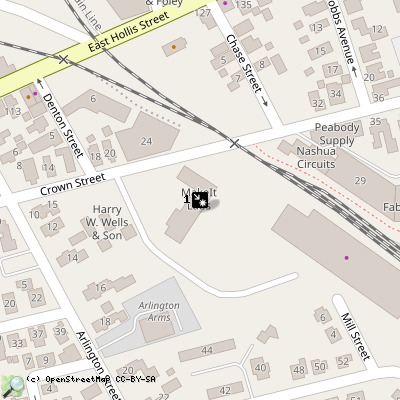
| id | symbol | latitude | longitude | description |
|---|---|---|---|---|
| MakeIt Labs | ||||
| 1 |  |
42.76016º | -71.44871º | |
start.txt · Last modified: by Brian Utterback
Discussion