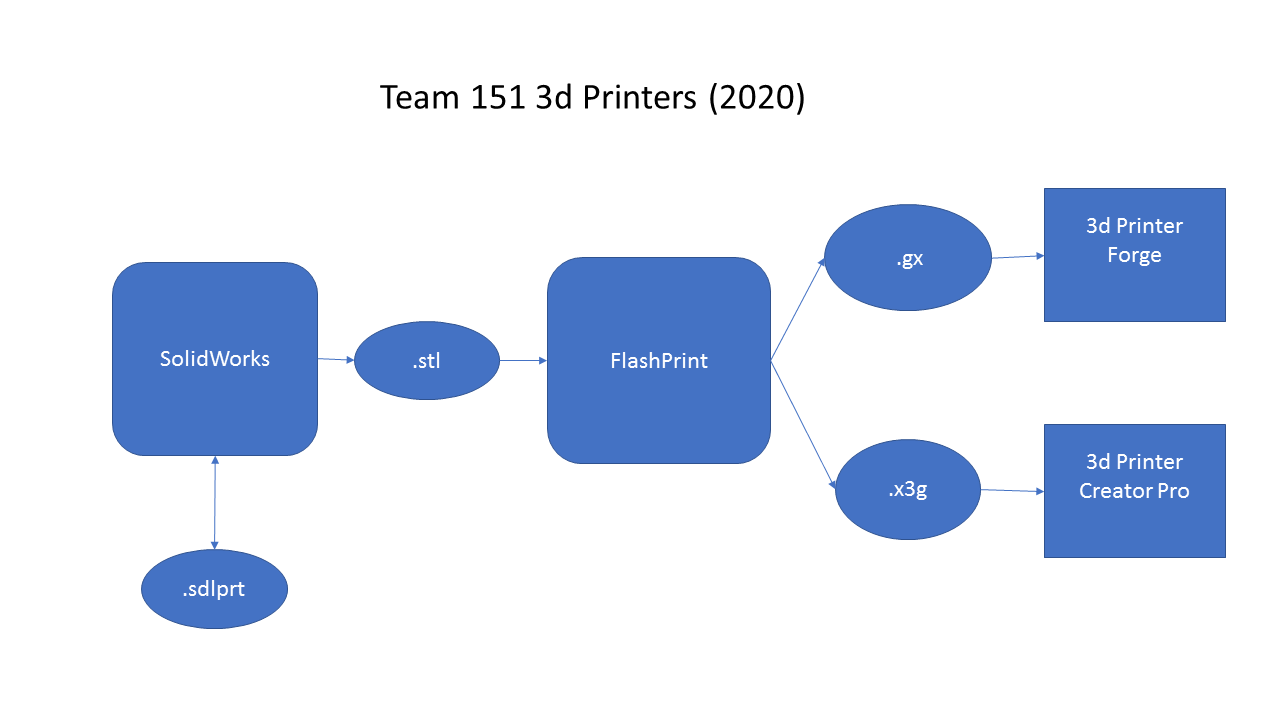
3d printer data flow
The 3d printing process starts with some sort of CAD or modelling program like SolidWorks. A model of the part is created using this program. Once the model is complete, these programs have the capability to export the model into a STL (stereo lithography) file. The STL files are simply a collection of x,y,z points of the model. There is no units or material or other information in these files. They are a dumb, open source format which can be read, created or modified by a number of other programs.
The second step is slicing the model. This is reading the STL file and making G-Code to produce that model. G-Code is machine instructions for a computerized machine tool. For a 3d printer these commands are typically to move to a location and extrude filament. G-code is may also include other command such as the temperature of the extruder head or the temperature of the bed. The G-code is targeted to a specific model of printer.
Slicing programs also may allow set some parameters of the printing process. For example, the fill percentage is the amount of material that is used for the solid sections of the part. The slicer may also allow the user to add supports when printing overhanging sections of the model. Depending on the printer the slicer may allow you to specify the orientation of the part, temperatures, speeds etc. Slicing is in many ways an art form which can be customized for specific needs.
The final step in the process is moving the G-Code onto the printer and running.